Sketchbook Journal KDP Interiors: Streamlining Your Low-Content Publishing Workflow
For self-publishers and digital entrepreneurs, the bottleneck in building a passive income stream on Amazon KDP is often the design phase. Creating high-quality, consistent interiors from scratch requires significant time, software proficiency, and technical knowledge of print specifications. Sketchbook Journal KDP Interiors serves as a foundational asset in this production pipeline, bridging the gap between concept and live product. Rather than viewing these templates merely as blank pages, successful publishers treat them as standardized components within a larger business system. This approach reduces friction during the upload process and ensures that every publication meets professional quality standards without requiring hours of manual formatting.
Integrating pre-formatted interiors into your workflow allows you to shift focus from repetitive layout tasks to strategic activities like niche research, keyword optimization, and cover design. When you utilize a resource that provides editable AI files alongside print-ready PDFs, you are not just buying a template; you are acquiring a flexible base for multiple product variations. This efficiency is critical for professionals, educators, and creators who need to maintain a steady release schedule while managing other business responsibilities.
Technical Specifications and Platform Compatibility
The most common point of failure in low-content publishing is file rejection due to incorrect margins or bleed settings. This Sketchbook Journal interior package addresses these technical risks by adhering strictly to Amazon’s current manufacturing guidelines. Understanding the specific dimensions and file structures included in this asset is essential for seamless integration into your publishing dashboard.
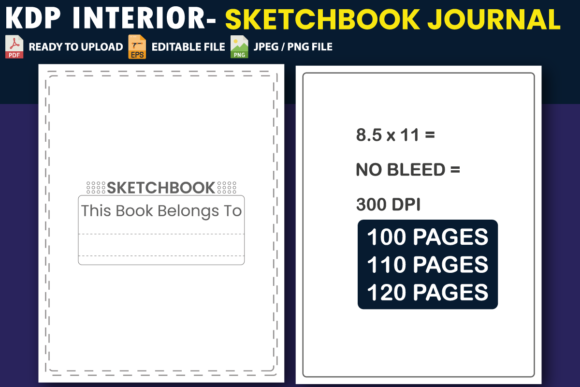
- Dimensions: The 8.5″ x 11″ format is the industry standard for sketchbooks and journals, offering ample drawing space while remaining cost-effective to print.
- Page Count Variations: Access to 100, 110, and 120-page versions allows you to test different price points and spine widths without redesigning the interior.
- Bleed Configuration: These files are set up with "No Bleed," which is the correct specification for standard sketchbooks where content does not extend to the physical edge of the paper. This prevents accidental cropping of margin lines during trimming.
- File Formats: The inclusion of PDF, JPEG, PNG, and editable Adobe Illustrator (AI) vector files ensures compatibility across different operating systems and software preferences.
Because these files have been tested on KDP, they eliminate the guesswork associated with margin safety zones. For publishers managing large catalogs, this reliability reduces the administrative burden of fixing rejected manuscripts and accelerates the time-to-market for new titles.
Customization Strategies Using Editable Vector Files
While the ready-to-upload PDF is convenient for immediate execution, the true value for long-term business growth lies in the editable AI vector files. Relying solely on stock interiors can lead to duplicate content issues or market saturation. Customization transforms a generic asset into a unique product tailored to specific sub-niches.
Adapting for Specific Audiences
Professionals and educators can modify the base sketchbook template to serve specialized functions. By opening the AI file in Adobe Illustrator or compatible vector software, you can adjust line weights, add header text, or incorporate branding elements. For example, an art teacher might add a "Student Name" field and project tracking boxes to create a classroom-specific portfolio journal. A fashion designer could alter the page layout to include croquis silhouettes, turning a blank sketchbook into a specialized design tool. This level of adaptation increases the perceived value of the book and targets buyers with higher intent.
Creating Product Bundles and Series
Consistency is key to building a recognizable brand on Amazon. Using the same base interior structure across multiple titles creates a cohesive series. You can keep the core 8.5″ x 11″ sketchbook layout identical while changing only the cover design and title metadata. Alternatively, use the editable files to create complementary products, such as a companion guide or a structured workbook that shares the same visual language as the blank sketchbook. This cross-pollination encourages customers to purchase multiple items from your catalog.
Workflow Integration: From Download to Publication
Incorporating Sketchbook Journal KDP Interiors into your existing routine requires a systematic approach to file management and quality assurance. Treat the download as the first step in a verified production checklist rather than a final solution.
- Asset Organization: Upon downloading, immediately organize files into project-specific folders. Rename generic filenames to include your internal SKU, niche keyword, and version number (e.g., Sketchbook_Architecture_8.5x11_110pg_v2.pdf). This prevents uploading the wrong file version when managing dozens of listings.
- Pre-Upload Verification: Even though files are pre-tested, always run the PDF through Amazon’s Previewer tool before publishing. Verify that the safe zone margins align correctly with your intended trim size. Check the first and last pages specifically, as these are most susceptible to binding shifts.
- Cover Alignment: Use the confirmed interior page count to calculate your exact spine width. Since this interior offers 100, 110, and 120-page options, ensure your cover file matches the specific interior PDF you intend to upload. Mismatched page counts are a frequent cause of printing errors.
- Metadata Synchronization: Align your backend keywords and book description with the specific features of the interior. If you customized the AI file to include graph paper or dot grid sections, explicitly mention this in the description. Accurate metadata reduces return rates by setting correct customer expectations.
Quality Control and Long-Term Asset Management
Sustainable publishing businesses rely on reusable assets. The high-resolution nature of these files means they can be repurposed beyond Amazon KDP. The JPEG and PNG formats allow you to create mockups for social media marketing, Etsy listings, or personal portfolio websites without needing to re-export from the source file. Maintaining a library of verified, high-quality interiors reduces future production costs and creates a scalable foundation for expansion.
When evaluating the usability of these interiors over time, consider how they interact with other tools in your stack. For instance, if you use Canva for cover design, having PNG previews of the interior helps visualize the final product without switching between applications. If you use project management software like Trello or Notion, link directly to the stored AI files so team members or virtual assistants can access the correct source material without requesting transfers. This centralized asset management minimizes version control errors and streamlines collaboration.
Practical Applications Across User Segments
The versatility of a blank sketchbook journal extends far beyond traditional artists. Understanding these diverse use cases helps in positioning the product effectively during the marketing and listing optimization phases.
Freelancers and Creatives: Many professionals use physical notebooks for client brainstorming and wireframing. A clean, unbranded 8.5″ x 11″ interior appeals to this demographic because it lacks distracting pre-printed prompts, allowing for unrestricted ideation. Marketing these journals as "professional ideation tools" rather than just "drawing books" opens up B2B and professional development niches.
Educators and Students: The 110 and 120-page options align well with academic semesters. Teachers can customize the editable AI files to add syllabus trackers or assignment logs on the first few pages, creating a hybrid planner-sketchbook. This functional adaptation solves a specific organizational problem, distinguishing the product from generic competitors.
Small Business Owners: Branded merchandise is a powerful marketing tool. Business owners can use the editable vector files to insert their logo subtly on each page or create custom sketchbooks for corporate retreats and workshops. Providing a tangible, useful item enhances brand recall more effectively than disposable promotional materials.
Optimizing for Search and User Experience
While the interior content is crucial, discoverability drives sales. When listing a book created with Sketchbook Journal KDP Interiors, transparency about the interior specifications builds trust. Clearly state the page count, paper type implications (standard white paper), and dimensions in the bullet points. Customers searching for specific sizes or page lengths often filter results based on these attributes. Accurate data entry ensures your product appears in relevant searches and satisfies user intent.
Furthermore, leverage the "Look Inside" feature by ensuring the first few pages of your uploaded PDF are representative of the entire book. If you have customized the interior using the AI files, make sure those unique features appear early in the preview. A blank preview suggests a low-effort product, whereas a preview showing thoughtful layout or customization signals quality. This small adjustment in how you prepare the file for upload can significantly impact conversion rates.
Ultimately, Sketchbook Journal KDP Interiors functions as a productivity multiplier. It removes technical barriers, ensures manufacturing compliance, and provides a canvas for creative differentiation. By treating this asset as a modular component of a broader publishing strategy, you can maintain high output quality while freeing up mental bandwidth for business growth and audience engagement. Whether you are launching your first title or scaling an existing catalog, the right interior foundation is essential for sustainable success in the competitive low-content market.