Book Review: KDP Interiors for 6x9 Publishing
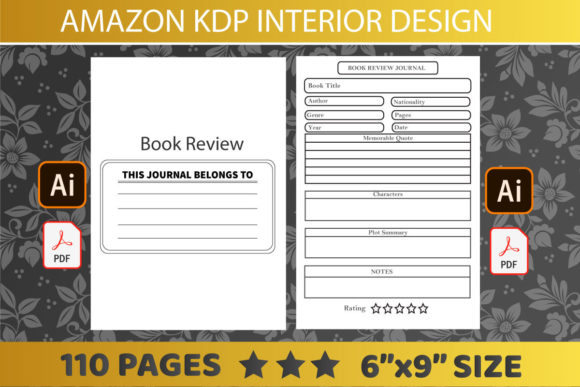
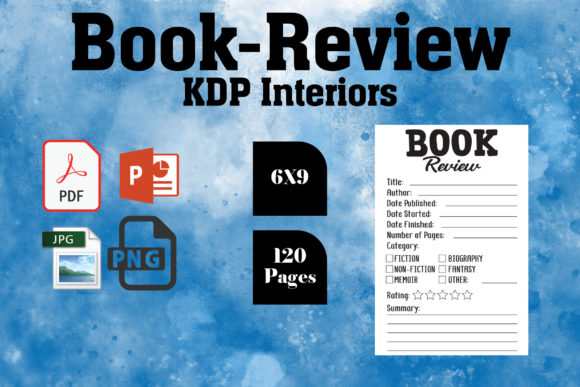
For self-publishers and low-content book creators, the interior file is often the biggest bottleneck in the production pipeline. You have a cover ready, your keywords are researched, and your niche is validated, but formatting the inside of the book brings everything to a halt. This review examines the Book Review - KDP Interiors package specifically configured for the popular 6″ x 9″ trim size. With 120 pages of pre-formatted content available in high-resolution PDF, PPTX, and JPEG formats, this resource aims to bridge the gap between amateur formatting and professional print readiness.
The promise here is straightforward: eliminate technical friction. When evaluating any KDP interior template, the primary concern is always compliance with Amazon’s stringent printing guidelines. This specific asset has been tested on KDP, which significantly reduces the anxiety associated with upload errors. For entrepreneurs and freelancers managing multiple titles, having a verified 300 DPI foundation means you can focus on marketing and niche research rather than troubleshooting margin warnings or bleed settings.
Technical Specifications and Print Compliance
The most critical aspect of this interior package is its adherence to industry standards. The 6″ x 9″ dimension remains the gold standard for journals, planners, notebooks, and trade paperbacks because it offers an optimal balance of portability and writing space. However, size alone does not guarantee quality. The resolution and file integrity matter just as much.
- Resolution: All files are rendered at 300 DPI. This is non-negotiable for print. Anything lower risks pixelation or blurriness when ink hits paper, especially for fine lines or grayscale elements.
- Page Count: At 120 pages, this interior hits a sweet spot for spine width. Books under 100 pages often cannot have text on the spine, making them harder to identify on a shelf. Crossing the 120-page threshold allows for better branding visibility.
- Bleed Options: The inclusion of both bleed and no-bleed variations provides necessary flexibility. If your design extends to the edge of the page, the bleed version ensures no white borders appear after trimming. For standard lined notebooks or text-heavy layouts, the no-bleed option maintains safe margins automatically.
- File Formats: While PDF is the final delivery format for KDP, the inclusion of PPTX and JPEG source files is a significant value-add for creators who want to customize the interior without learning complex design software like InDesign.
Versatility Across Creative and Commercial Niches
One of the standout qualities observed during this Book Review - KDP Interiors assessment is the adaptability of the 120-page structure. It is not limited to a single use case. Professionals and educators can repurpose this foundation for various functional products without starting from scratch.
Professional and Business Applications
Freelancers and consultants often create lead magnets or branded workbooks. A clean, professionally formatted 6x9 interior lends immediate credibility to these materials. Whether you are producing a client intake journal, a meeting notebook, or a specialized industry logbook, the pre-set margins ensure that your content looks intentional. The ability to edit the PPTX file means you can add your logo, adjust headers, or modify prompts to match your corporate identity before exporting to PDF.
Educational and Personal Development Tools
Educators and coaches frequently require structured spaces for students or clients. This interior specification supports guided journals, gratitude trackers, and skill-building worksheets. Because the files are high-resolution, intricate designs or subtle watermarks remain crisp. For personal development authors, the 120-page length provides enough substance to feel like a comprehensive course companion without overwhelming the user with excessive blank space.
Commercial Low-Content Publishing
For publishers scaling a KDP business, speed is essential. Testing files repeatedly eats into profit margins. Since these interiors have been validated on KDP, they serve as a reliable master template. You can duplicate the project, swap out the cover, and perhaps tweak the first few pages to create a series. This efficiency allows for rapid iteration in competitive niches like fitness tracking, recipe logging, or hobbyist record-keeping.
Evaluating Usability and Workflow Integration
Having the right specs is only half the battle; the workflow must also be smooth. During testing, the multi-format approach proved particularly useful for different types of users. If you are a designer comfortable with vector graphics, the PDF serves as a perfect base layer. However, for marketers or business owners who live in PowerPoint or Canva, the PPTX and JPEG assets lower the barrier to entry.
This accessibility does not come at the cost of quality. Often, "easy-to-edit" templates suffer from poor construction, with misaligned guides or incorrect color profiles. In this case, the 300 DPI standard holds up even when manipulating elements within presentation software. Just remember to export your final customized version as a high-quality PDF to maintain that print-ready fidelity.
Practical Considerations Before Implementation
While this interior package solves many formatting headaches, users should approach implementation with a strategic mindset. Here are practical recommendations based on real-world publishing experience:
- Verify Your Trim Size Early: Ensure your cover dimensions match the 6x9 interior exactly. A common mistake is designing a cover for a different size and trying to force the interior to fit later. Always start with the interior specs confirmed.
- Check Gutter Margins: Even with a tested template, always order a physical proof if you are adding significant custom content near the binding. Paper thickness and glue can vary slightly between print facilities, and seeing the physical book is the only way to guarantee usability.
- Customize Beyond the Basics: To stand out in search results, avoid uploading the interior completely unaltered. Use the editable files to add unique value propositions, instructions, or branded elements. Amazon’s algorithms and customers favor distinctiveness over generic duplication.
- Maintain File Hygiene: When editing PPTX or JPEG sources, keep your original master files untouched. Create working copies for each new project. This prevents accidental corruption of your verified baseline and saves time if you need to revert changes.
Final Thoughts on Value and Efficiency
The Book Review - KDP Interiors for the 6x9 format represents a pragmatic solution for serious publishers. It removes the technical guesswork that often derails creative projects. By providing tested, high-resolution files in multiple editable formats, it respects both the novice creator’s learning curve and the professional publisher’s need for speed.
Ultimately, the value lies in time saved and errors avoided. In the self-publishing ecosystem, your time is best spent on market research, audience building, and content strategy. Letting a verified interior handle the structural heavy lifting allows you to allocate resources where they generate the most return. Whether you are launching your first journal or scaling a catalog of educational workbooks, this specification provides a solid, professional foundation upon which to build.