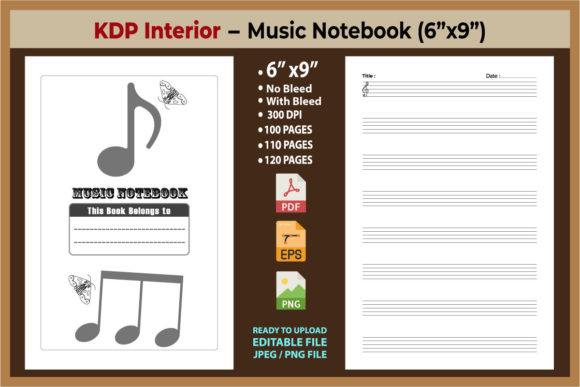
KDP Interiors Sheet Music Notebook: Ensuring Print Quality and Usability
Creating a successful low-content book on Amazon requires more than just uploading a file; it demands an understanding of how physical specifications translate to user experience. When evaluating a KDP Interiors Sheet Music Notebook, the technical details are not merely administrative checkboxes. They define whether the final product is a functional tool for musicians or a frustrating disappointment. For creators, educators, and entrepreneurs entering this niche, distinguishing between a generic template and a professionally engineered interior is the first step toward building a sustainable publishing portfolio.
The specific configuration of 8.5×11 inches with 123 pages and no bleed settings represents a deliberate design choice optimized for standard manuscript paper. However, many publishers overlook why these parameters matter, leading to preventable errors during the upload process or poor customer reviews post-publication. Understanding the relationship between these dimensions, the page count, and the included file formats allows you to leverage this asset effectively while avoiding common pitfalls that plague new KDP authors.
Navigating Bleed Settings and Margin Safety
One of the most frequent technical misunderstandings involves the "No Bleed" setting. In the context of a sheet music notebook, selecting a no bleed option does not mean the content extends to the edge of the paper without margins. On the contrary, it requires strict adherence to safe zones. A high-quality print-ready PDF for this format will have pre-calculated margins that account for binding and trimming. If you attempt to modify the interior or add custom elements without respecting these boundaries, your staff lines or note headers may be cropped during production.
Musicians require ample space on the inner gutter margin to ensure the book lays flat and remains readable when open. A common mistake is treating the digital preview as the final authority. While the provided PDF is ready to print, users sometimes inadvertently alter margin settings when combining files or adding ISBN pages. Always verify that the safe zone remains intact. The 8.5×11 dimension is the industry standard for letter-size manuscript paper, but only if the printable area is respected. If you are using the included AI or EPS source files to customize the layout, ensure your artboard matches the exact trim size plus the required safety margins before exporting a new PDF.
Evaluating Page Count and Spine Width
The specification of 123 pages is significant for both usability and manufacturing constraints. Beginners often assume that maximizing page count increases perceived value, but in sheet music notebooks, odd page counts can create layout challenges. Standard printing signatures often prefer even numbers. While KDP accommodates 123 pages, you must understand how this affects the spine width calculation for your cover design. Using an incorrect spine width formula based on a rounded page count will result in cover misalignment.
Furthermore, consider the end-user's workflow. A 123-page notebook offers substantial capacity for composition without becoming unwieldy. However, if you are modifying this template, avoid arbitrarily changing the page count unless you have recalculated the spine width and verified that the new count aligns with your binding goals. Consistency between the interior PDF metadata and the cover template is non-negotiable. Discrepancies here are the primary cause of automated rejection during the KDP review process, delaying your launch and wasting valuable marketing momentum.
File Format Integrity and Source Management
This product package includes multiple formats: AI, EPS, PDF, JPG, and Mockup files. A critical error occurs when publishers use the wrong file type for production. The High-Quality Print Ready PDF is the only file intended for direct upload to KDP. The AI and EPS files are vector sources meant for customization, not for printing. Uploading a flattened JPG or an unoptimized vector export can result in pixelated staff lines or inconsistent line weights that look unprofessional in print.
Vector integrity matters immensely in musical notation. Staff lines must be crisp and uniform. If you edit the source files in Adobe Illustrator or similar software, always outline fonts and check stroke weights before generating a new print PDF. Rasterizing vector elements at insufficient DPI is another common issue. Ensure any exported images maintain at least 300 DPI at actual size. The included mockup files serve a different purpose entirely; they are for marketing and listing optimization, never for interior production. Confusing these assets leads to blurry interiors and wasted ad spend promoting a product that doesn't match its listing images.
Customization Risks and Best Practices
Having access to editable source files is a tremendous advantage, but it introduces risk. Many creators feel compelled to redesign the interior to make it "unique," often breaking the functional geometry of the sheet music. Before altering the spacing of staves or barlines, test print a single page at 100% scale. Screen resolution is deceptive; what looks spacious on a monitor may be cramped on paper. Musicians have specific ergonomic requirements for writing notes. Deviating from standard spacing without testing can render the notebook unusable for serious composers.
If you do customize, maintain the original document's color profile. KDP interiors for this category are typically black and white. Introducing RGB colors or gradients in the source file will convert unpredictably during the CMYK print process, potentially resulting in muddy gray staff lines instead of sharp black ones. Stick to 100% K (black) for all line work to ensure the highest contrast and clarity. This attention to technical detail separates professional-grade interiors from amateur attempts.
Verifying Usability Before Publication
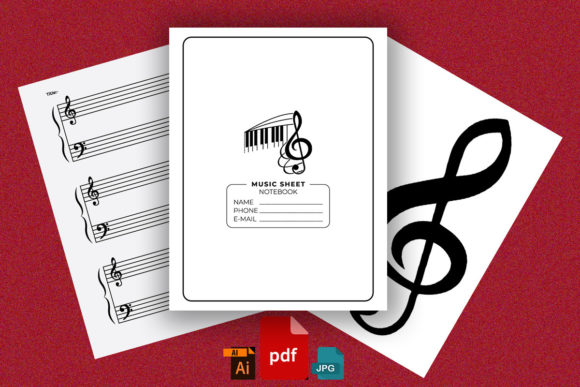
Beyond technical specs, evaluate the practical application of the notebook. Does the 8.5×11 format suit your target audience? This size is ideal for piano, orchestral scores, and classroom use, but less suitable for guitarists who often prefer smaller, portable formats. Aligning the product specifications with audience expectations prevents negative feedback regarding size appropriateness. Review the included mockups critically to ensure they accurately represent the interior layout. Misleading visuals create returns and damage seller metrics.
Finally, treat the "Ready to Print" designation as a baseline, not a guarantee against user error. Even a perfect PDF can fail if uploaded with incorrect metadata or paired with a mismatched cover. Create a systematic pre-flight checklist:
- Verify PDF dimensions match 8.5×11 inches exactly.
- Confirm page count is 123 in both the file properties and KDP setup.
- Ensure "No Bleed" is selected in the KDP dashboard.
- Check that all fonts are embedded or outlined.
- Validate spine width against current KDP calculator for 123 pages.
By approaching the KDP Interiors Sheet Music Notebook with technical diligence rather than assumption, you transform a simple digital asset into a reliable, high-quality product. Success in low-content publishing comes from respecting the intersection of design standards, manufacturing realities, and user needs. When these elements align, the result is a resource that serves musicians effectively and builds lasting credibility for your publishing brand.